Monday, November 24, 2014

Week 11 Blog Post

Self Promotion and Website Creation 


On Tuesday, Gretchen Thomas, a professor at The University of Georgia, chatted with us in a Hangout session. It was good to see a professor who is instructing a class that is similar to ours. She had some time free in her schedule, so the conversation was just to get acquainted. 


Following our chat with Gretchen, we went over the various web-based editing sites available to create our very own site. Our site will essentially promote ourselves for professional purposes. Weebly, Wix, and Wordpress are sites that we advised to use. Each site mentioned offers an intuitive user interface, allowing the end user to have zero knowledge of any code. This is particularly good for business owners or upcoming professionals who cannot afford to hire a web developer. I chose to use Wix, as I have some experience with this editor. I was actually hired by Murray Grove to edit their site with this editor, and it turned out nicely. 


On Thursday, the class was supposed to have our bi-monthly "App Smack-down." Instead, we were to group up and prepare for an in class assignment. John AndersonEmily Dellane and I were instructed to pick two websites from a list displayed on the front of the classroom. We were then told to compare the two websites, listing four pros and four cons relating to their overall look. Our document compared the sites of JK Rowling and Bill Selak. We then presented our findings to the rest of the class and received feedback thereafter. It was a great experience to analyze the details of personal biography websites.I think this has better prepared me for when I create my own.


We were also assigned to read chapter 9 of "The Connected Educator," by Sheryl Nussbaum-Beach and Lani Ritter Hall. This chapter discusses how the internet has become a resourceful place for education. It also highlights how it changes the learning dynamic of individuals who utilize it. There are four core components discussed: knowledge, pedagogy, connections, and capacity. As a computer science major, I know it is imperative to stay relevant in the realm of new technological breakthroughs. If you fail to stay connected, you become an invaluable asset to a company. The same goes for educators. Why would a student want dated information or instruction?



The article I read from the Livebinder is titled "8 Fresh Web Design Tips from Wix Pros to Share on Twitter." The tips given were: emulate other sites, use accent colors, resist typefaces, less is more, achieve symmetry, build from the background out, integrate usability, and build a project timetable.I definitely learned some creative ideas that I did not harness when building the site for Murray Grove. I think knowing how to utilize a site, and executing a stylish look are two different skill sets that need to be learned.   


Monday, November 17, 2014

Week Ten Blog Post

Gather Your Information and Share!

This past Tuesday, Scott Rocco, a superintendent and adjunct professor, showed the class some valuable apps that can be utilized as a professional. The apps shown were  PadletBufferAwesome ScreenshotPocket, and DoodlePadlet is an application that gives the user a collaborative environment to share files, text, and other media. It seems really resourceful for brainstorming with colleagues or classmates. The next app shown was Buffer. This application lets you schedule your tweets sporadically throughout the day. Next on the list was Awesome Screenshot. This application allows the user to take screenshots, similar to the snipping tool application within windows. The upside to this app is that it allows you to record audio and video, rather than only a single picture. The next application was called Pocket. This application allows you to save articles and other things you want to look at later. This seems invaluable for when you're in a rush and need to put procrastination on hold. Last but not least, Doodle was introduced. Scott gave us an interactive tutorial showing us how this scheduling application works. When a manager wants to host a meeting, every co-worker goes to a provided link and then specifies what times they are available for a meeting. When every co-worker has put in their availability, the application will provide an ideal time to meet, according to everyone's availability.


Following our guest speaker, Professor Calderwood introduced Diigo and IFTTT.  Diigo is a curation tool that keeps all of your important read material in one place. It allows you to search for content at a later time, as well as collaborate your data with others. Next, he introduced my favorite app presented on Tuesday, IFTTT. "If Then Then That" allows the internet to do alot of meticoulous work for you. You can link various online applications together, allowing you to create very neat "recipes." I now have it to when I post on Instagram, I automatically post on Facebook as well. I also set a recipe to change the background of my phone every time a new post on Reddit emerges.


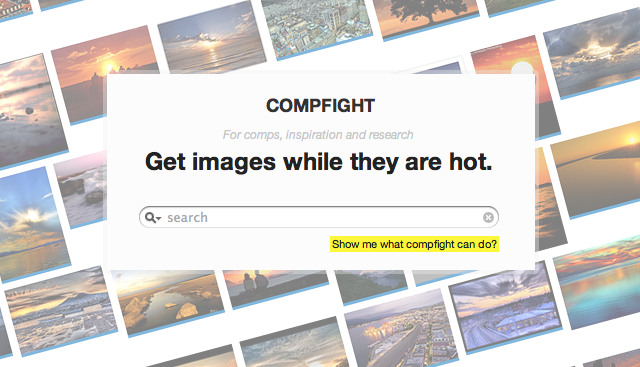
On Thursday, Professor Calderwood presented some applications that really can help me with my current job. The application he displayed were canvapiethistweroid tchat,swayy,  everypostpiktochart,  storify, tagboard,compfight, , and paperli. Canva is an awesome application that allows you to create visual representations of data like never before. Various programs provided By Microsoft often become a headache to use. Thank to Canva, I can create charts for Stockton, without it being so time consuming. Piethis is a heaven-sent for the workplace. I have always wondered how we could utilize web-chat in the office, and Piethis offers a great interface for this. I plan to introduce this application to my operations manager to see what she thinks. Because I don't want to make this blog too wordy, I will only mention one last favorite of mine, Compfight. It has always been a struggle for me to find quality image files that weren't a legal issue for External Affairs. This site allows you to search for clip art that you can utilize without worry of using owned media. I plan to use this site as my go-to!


The article I chose to read  was"How To Become a Paper.li Publisher – Five Simple Steps." This article goes to explain how the service lets you combine news from several sources using keywords and hash tags to find content matching your theme. The first step to creating your first newspaper is creating an account. You can connect with your Twitter or Google account. Step two is to find your sources. You can search hash tags, RSS feeds, Facebook posts, and Twitter accounts. Step three is to fine-tune your paper. This includes setting the frequency of your posts, changing the theme and title. The final step is to curate. This means deleting any posts posts or articles that aren't relevant to your theme. You can blacklist sources as well. I personally think this is a great way to tune into specific areas of interest and gives you the ability to share those interests with others.

Monday, November 10, 2014

Week Nine Blog

Week Nine Blog


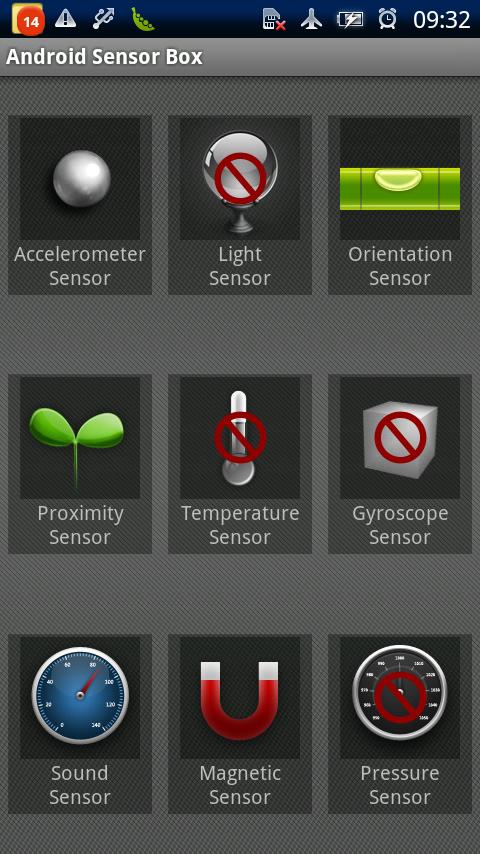
This week was held as a hybrid. We were in class on Tuesday and had class online on Thursday. On Tuesday, we had another "App Smack-down." I presented Sensor Box for Android,which is a sensor diagnostics tool for mobile devices running Android OS. It gives an array of options that give any user the ability to test every sensor on on their device. This is beneficial for many reasons. For example if you ever come across a time where where your screen wont shut off when you put it against your face, there is a test for that, There is an option to test the proximity sensor, which senses how far away an object is away from the phone. If the test yields bad results, you can now diagnose your phone for a future repair. Other tests include, accelerometor, light, orientation, temperature, gyroscope, sound, magnet, and pressure.


         On Thursday, we had to watch an online Google Hangouts sessions about story telling  applications. It was a call between professor Calderwood and speakers, Hannah Clemmons, Jonathan Wylie, and Shannon McClintock Miller. The tools they outlined were Animoto, ToonTastic, and FlipSnack. All of these apps offer various ways to present information to an audience with an animated interface. If executed properly, the presentation can be an effective tool in conveying a message. For our assignment, we had to tell prospective Stockton freshman why our major is the best choice. My presentation was about the computer science program.
digital-storytelling-1.jpg
        For my Livebinder reading, I chose "10 Apps & Sites for Digital Storytelling & more!" This was a great article, explaining the ins and outs of digital story telling. This article answered the following questions: What is digital storytelling, why use digital storytelling and which tools are best?  This gave me a good idea, with exception to the Google Hangout video, of what digital storytelling was all about. Following that, Erin Klein lists her top ten favorite storytelling apps.


       Then, in Chapter 4 of our textbook " Untangling the Web," the social web is discussed. The first application this chapter mentions is TodaysMeet. It allows teachers to create a "back channel" that gives educators the ability to discuss and document classroom interactions. Not a bad tool for educators, as it is apparently one of the simplest tools you can use.The next tools mentioned are Skype and Kidblog, Skype has its' various benefits, as we have discussed the benefits of this app in previous sections. Kidblog, on the other hand, allows the educator to establish safe spaces for students to share online that can be moderated at the discretion of the teacher.  Lastly, there is Edmodo and Twitter. Edmodo can be said to be Blackboard on steroids. I really do understand why Edmodo is preferred as a learning management system. IT offers a seamless user interface and offers intuitive functionality.  Twitter can be termed a micro-blog, due to its 140 character limitation. We, as a class have been utilizing this network the entire semester. 

Monday, November 3, 2014

Week Eight Blog Post


Social Media Etiquette and Online Tools


This week in class was a bit different, as Professor Calderwood was in the UK on Tuesday with Google. Having Tuesday off was nice, but there's always work to be done. On Thursday, the class presented finished projects regarding social media etiquette. I took a lot of time to prepare the slides, but when it came time to present, I had some technical difficulties.


I decided to use Google Docs to present my project, made it an effort to make things look smooth. To utilize notes on my tablet, I realized it was necessary to to run several instances of Teamviewer on a dual screen monitor and stream it via my tablet and podium. This method didn't serve me as well as I had wished. I spent much of my time trying to use my tablet to transition the slides, and had a hard time reading the tiny sized notes. It just goes to show that there is such a thing as too much tech. Nevertheless, presenting wasn't a huge anxiety because I felt like I had prepared my slides well enough.


My project was regarding the incident of "The Donglegate." This event involved two male attendees at software development conference PyCon, made a an inappropriate joke. Tech developer Adria Richards was offended by the jokes and posted her feelings on Twitter. The backlash was extreme and one of the men was fired. She was also fired for "publicly shaming the offenders,"SendGrid CEO Jim Franklin said in a blog post. the second part of the presentation highlighted on preventative measures and administrative action.


We also had reading from our chapter five of Connected Educator, "Using Tools to Support Connected Learning." Firstly, Delicious and Diigo were mentioned as being useful collaborative tools for documenting and archiving the information you stumble upon. This section reminds me a lot of the curation chapter we had read previously. Having what information you want available is an essential part of being an effective student and professional. Having the ability to to share your information with others is a huge benefit of using these two tools.

Being able to report your research publicly is also an effective way to show others in your field what you're working on and what interests you hold. Doing so will provide the professional with feedback, allowing them to build on their skills and research. Blogger, Wordpress, and Tublr are all good examples of online blogging tools. Google Docs is a collaborative tool that Matt Waldron and myself are using for our Statistics project. Having information for us all in one place, and the ability to work simultaneously is priceless. As a side note, I like how Taylor Binet pointed to Google Alerts in her blog. Knowing when your name is being used on the web can be great in nipping unwanted content in the bud.